
Secure Workforce Management for Corporate Teams
Protect BioSyn access, employee data and workforce system activity with configurable security controls.
BioSyn gives corporate teams a secure workforce management platform with controlled user access, password policies, MFA, SSO, allowed-location rules, session controls and security monitoring.
Your authorised users can access the tools they need, while BioSyn helps identify suspicious activity and potential threats to the system early.

Why Access Control Security Matters in Workforce Management
Protect Access to Your Workforce Management Platform
Corporate workforce systems hold sensitive employee, attendance, payroll and operational data. BioSyn helps protect that data by controlling how users access the platform, which authentication methods are required, where users may log in from, and how suspicious activity is monitored.
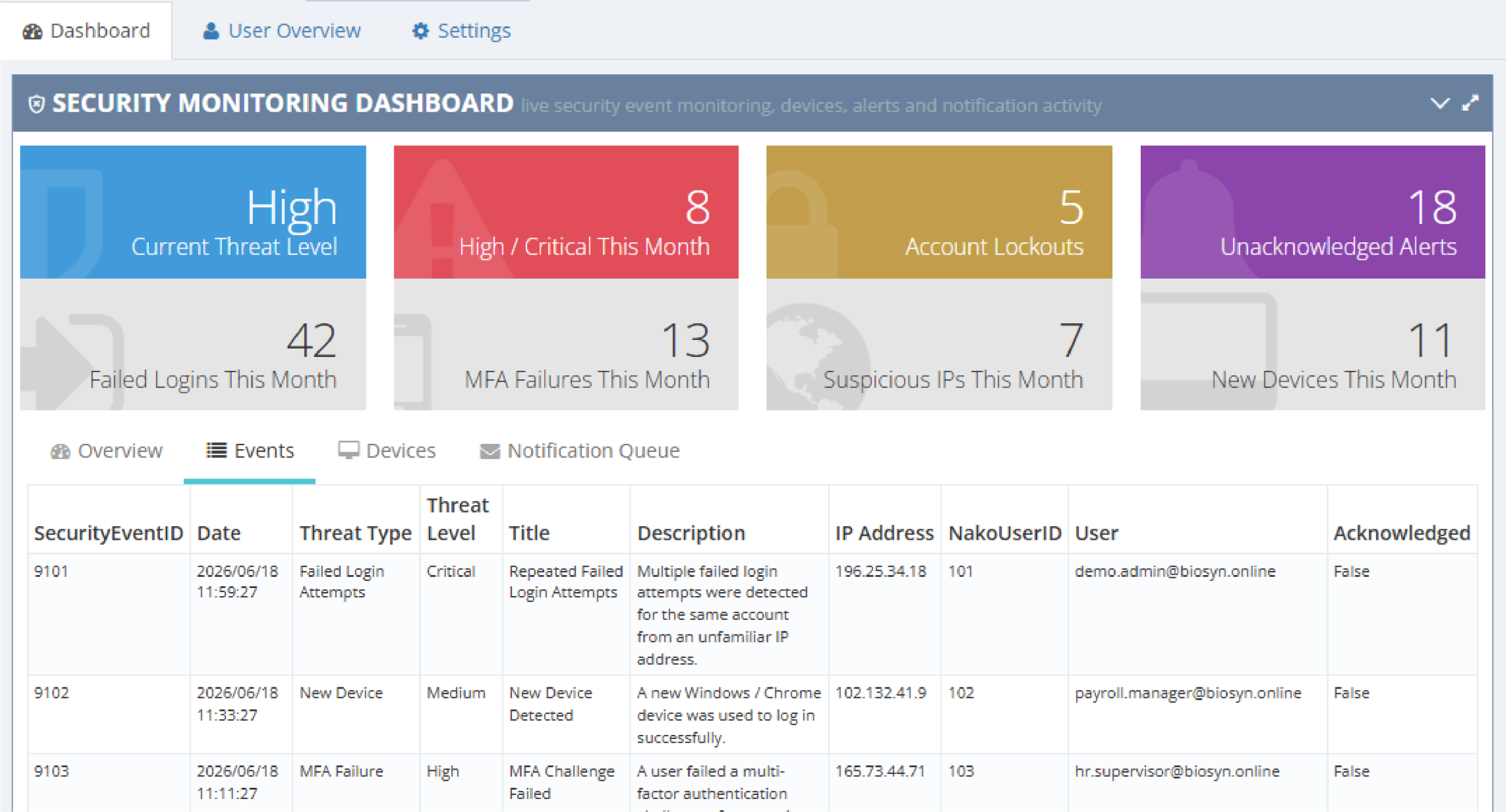
With BioSyn security settings, your team can access the system securely while administrators stay informed of failed logins, MFA issues, lockouts, new device activity, unusual locations and other potential threats.
- Protect workforce and attendance data.
- Reduce account compromise risk.
- Strengthen login and password controls.
- Add MFA for sensitive access.
- Centralise identity through SSO.
- Monitor or block suspicious locations.
- Notify administrators when security events occur.
Why Corporate Workforce System Security Matters
Corporate teams often have multiple user groups working across HR, payroll, operations, finance, IT and branch management. Each team needs access to the right tools, but uncontrolled access increases the risk of weak passwords, shared credentials, unauthorised logins and compromised accounts.
BioSyn helps corporate clients reduce this risk with configurable security controls designed specifically for workforce management environments.
- Protect employee and attendance data.
- Give authorised teams secure access to BioSyn.
- Reduce account compromise and password-related risk.
- Add MFA for sensitive access. Centralise authentication through SSO.
- Monitor suspicious logins and high-risk locations.
- Alert administrators when security events occur.
- Identify potential threats to the BioSyn platform early.

Configurable Security Settings
Build a Strong Security Foundation for BioSyn Access
BioSyn security settings define the default login and access behaviour for users inside the workforce management platform. These controls can be configured according to each client’s internal policy, user structure and risk profile.
Password Controls
Login Protection
Session Management
Minimum password length
Complexity rules
Password history
Password expiry settings
Account lockouts
Failed login thresholds
User protection rules
Session timeout
Remember Me controls
Token expiry settings

Multi-Factor Authentication (MFA) for Corporate Users
Add an Extra Layer of Protection Without Blocking Productive Access
BioSyn supports multi-factor authentication to help protect user accounts after username and password validation. Corporate clients can strengthen access for sensitive users and reduce the risk of compromised credentials while keeping the login process practical for approved teams.
-
Email OTP:
Secure one-time codes delivered by email. -
SMS OTP:
Verification via mobile device. -
Authenticator apps:
Microsoft Authenticator, Google Authenticator, Authy, 1Password, and Bitwarden. -
Trusted devices:
Reduce repeated MFA prompts for approved devices where policy allows.
Single Sign-On (SSO) Corporate Identity Control
Connect BioSyn Access to Existing Corporate Identity Providers
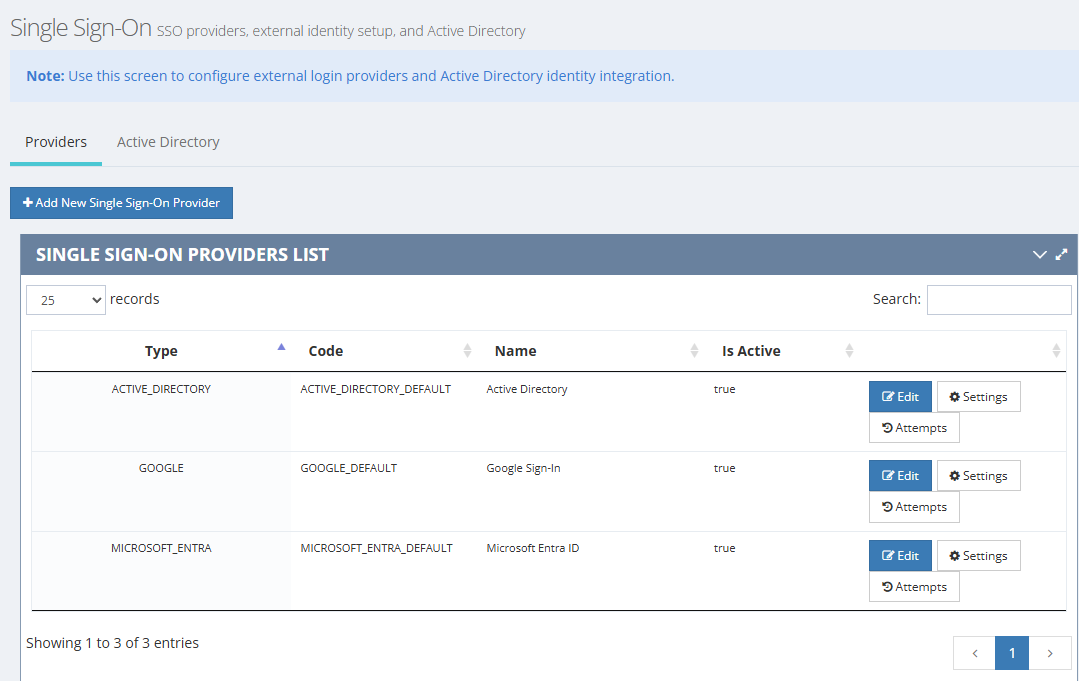
Single Sign-On allows BioSyn to integrate with external identity providers and corporate directories. This helps organisations reduce password-related risk, simplify login for authorised users and align BioSyn access with existing IT policies.
Benefits:
Simplified login:
One identity across systems.
Reduced password risks:
Fewer credentials for users to manage.
Centralised access control:
Align BioSyn access with existing IT policies.
Easier administration:
Support user-type mapping through groups.

Location-Aware Login Protection
Monitor, Escalate or Restrict Access from Unexpected Locations
BioSyn can restrict, monitor or escalate access based on approved locations. This helps corporate clients identify unusual access attempts and apply stronger controls when users log in from outside expected offices, regions, VPNs or site locations.
Monitor Only
Track unusual login activity without blocking access while policies are being tested.
Step-Up MFA
Require additional verification when a user logs in from a higher-risk location
Notify Security Team
Generate alerts for suspicious or unexpected login locations.
Block Access
Prevent access from high-risk or unapproved locations.
Supported Location Controls
- IP ranges
- Countries
- Regions
- Offices
- VPNs
- Sites
- Geo-radius rules.
Early Threat Detection and Security Notifications
Identify Suspicious Activity Inside BioSyn Early
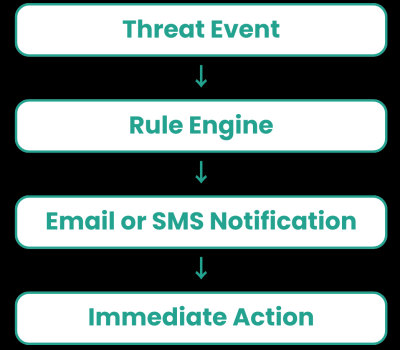
Automated alerts help administrators respond faster to possible security risks inside the BioSyn platform. Notification rules determine which events trigger alerts and which users, departments or security teams should be informed.
Events Monitored:
- Failed logins
- Account lockouts
- MFA failures
- SSO failures
- New devices
- Suspicious locations
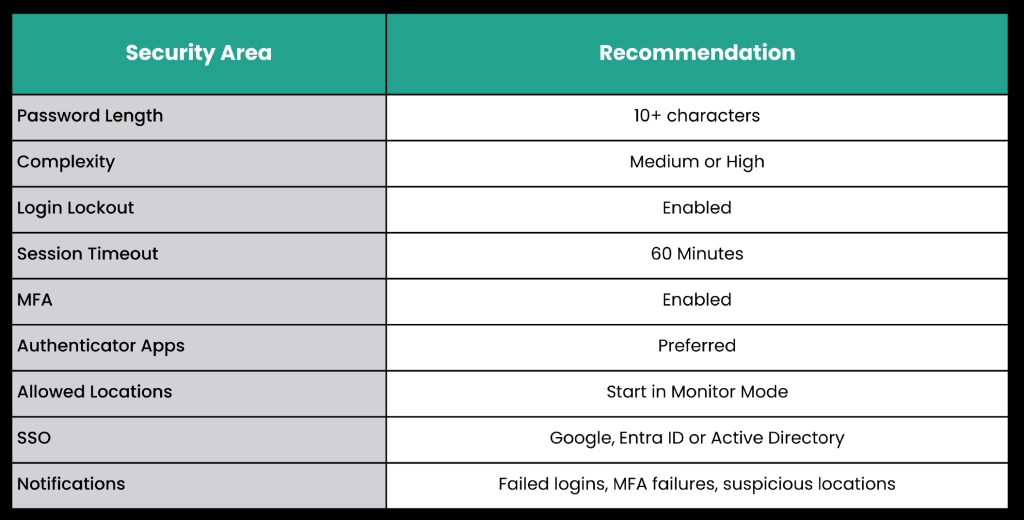
Recommended Corporate Security Baseline
The table below gives a practical starting point for corporate BioSyn security settings. Final settings should be configured according to each client’s internal security policy, user structure and operational needs.
Why Corporate Clients Choose BioSyn System Security
BioSyn combines workforce management functionality with practical security controls designed for corporate environments. Security settings are configurable, easy to administer and aligned with real operational needs across HR, payroll, operations and branch management.
- Secure access for corporate workforce teams.
- Configurable security controls per client environment.
- MFA and trusted-device support.
- Corporate identity integration through SSO.
- Microsoft Entra ID, Google Sign-In and Active Directory support.
- Location-aware login controls.
- Automated alerts and security notifications.
- Scalable workforce management platform.
- Security monitoring dashboard for early threat visibility inside BioSyn.
Protect Your Workforce Data with Confidence
BioSyn helps corporate organisations secure workforce management, time attendance access, user activity and employee data with configurable security settings, MFA, SSO, location-aware controls and automated notifications.
Frequently Asked Questions
BioSyn helps corporate clients secure access to their workforce management platform through configurable password policies, MFA, SSO, session controls, allowed-location rules and security event monitoring. These controls help protect employee data, manage authorised access and identify suspicious activity inside the BioSyn system early.
Yes. BioSyn supports multi-factor authentication options such as email OTP, SMS OTP, authenticator apps and trusted devices, depending on the client setup and security policy.
Yes. BioSyn can support corporate identity integration through Single Sign-On, including Microsoft Entra ID, Active Directory and Google Sign-In where configured for the client environment.
Yes. BioSyn can use location-aware controls such as IP ranges, countries, regions, offices, VPNs, sites and geo-radius rules. Clients can start in monitor mode, require step-up MFA, notify administrators or block access depending on policy.
Yes. BioSyn can notify administrators or security teams when security events occur, including failed logins, account lockouts, MFA failures, SSO failures, new device activity and suspicious locations.
Yes. BioSyn password and session settings can be configured according to each client’s internal requirements, including password length, complexity, history, expiry, lockout rules and session timeout.
BioSyn is designed to support corporate workforce management environments with controlled access, SSO, MFA, location-aware login protection, security notifications and monitoring dashboards. Final settings should be aligned with each client’s internal IT and security policies.
No. BioSyn is not a replacement for a client’s full cybersecurity stack. The security controls described on this page relate to secure access, user activity and suspicious activity monitoring inside the BioSyn workforce management platform.