Employee Time Clock App for Attendance Tracking

Employee Time Clock App
Employee Time Clock App for Efficient Workforce Management.

The power of mobile clocking

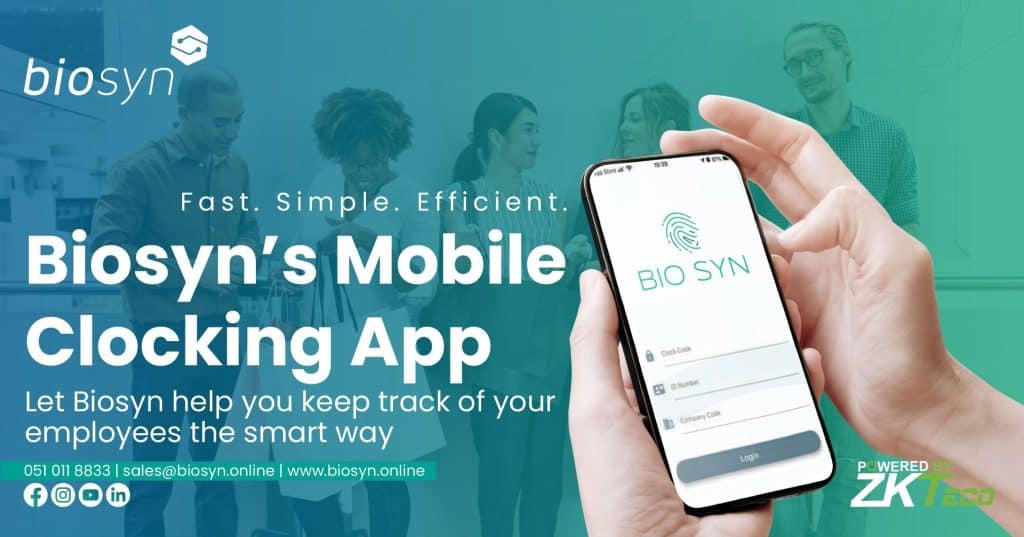
The BioSyn mobile app allows users to clock in and out from various job sites using their mobile devices, eliminating the need for traditional time and attendance (T&A) scanners. 

With geolocation capabilities, employees can only clock in when within a designated radius set by their employer, enhancing convenience for those working at multiple sites.

Work from anywhere, on any device

This app fosters trust between employers and employees by ensuring clock-ins occur on-site. Employees can view their clock-in location and time, reducing disputes over hours worked.

Available on major app stores such as iStore, Play Store, and Huawei Store, the BioSyn app is accessible to a broad audience, streamlining the time tracking process for both employers and employees.
Mobile App Clocking

Employee Time Clock App

The Ultimate Employee Time Clock App: Track Hours and Improve Productivity

The BioSyn system offers essential reports for tracking and analyzing your business performance in real-time. These reports provide insights into employee clockings, productivity, and overall performance.

If you have multiple employees clocking in and out at various locations, BioSyn reports help you monitor their clockings and spot inconsistencies. This information is crucial for improving processes and making data-driven decisions.

Additionally, the reports highlight areas for improvement and can motivate employees to enhance productivity. BioSyn also allows you to customize reports to fit your needs, enabling you to create templates and select relevant data fields.

This customization helps you focus on what matters most for informed decision-making. In summary, BioSyn reports are a powerful tool for elevating your business. They support informed decisions, monitor performance, and drive continuous improvement.

Simplicity is key

Simplify Attendance Tracking with Our Employee Time Clock App

The designers of the BioSyn mobile app prioritize user-friendliness, incorporating a simple dashboard that allows employees to easily clock in and out.

The dashboard clearly shows the employee’s last clock-in time, and users can access their clock history for reference. One of the key benefits of the BioSyn app is its offline clocking capability.

This means that employees can still clock in and out, even when they do not have access to a data connection or Wi-Fi. While offline clocking is a useful feature, the app’s developers recommend clocking in with a device that has a data connection or available Wi-Fi.

This ensures that the data is captured accurately and can be uploaded to the server in real-time. Having access to this data provides valuable insights into employee attendance and work patterns, which can be used to improve operational efficiency and overall business performance.


The BioSyn Mobile App.

streamlining Your Business with Our Employee Time Clock App

Workforce efficiency can be achieved

The BioSyn app serves both employees and supervisors effectively. Employees can log in to clock in and out of shifts, ensuring their working hours are accurately tracked.

This accuracy gives you peace of mind that your workforce is present and productive. Additionally, the app offers a supervisor login, enabling managers to clock in or out multiple employees simultaneously.

This feature saves time and boosts efficiency, especially for businesses with many employees, as it eliminates the need for individual logins. Overall, the BioSyn app includes various features tailored to meet business needs.

For example, the app provides real-time updates on employee clockings, allowing you to monitor your workforce in real-time.

 The app will save the geolocation and time and attendance data, and then upload the information to the server when a connection is established.

White Label In Detail

BioSyn White Label in detail

A turnkey solution to expand your business

The White Label option for time and attendance products lets you rebrand them as your own, giving you full control over marketing and sales.

This turnkey solution helps you start or expand your business with minimal risk, as it eliminates the need to develop, test, and launch a new product from scratch. 

You can use our pre-developed products right away.

White Label in Detail

The BioSyn White Label Infrastructure

Put the power in your hands

The BioSyn infrastructure is a powerful platform offering various capabilities. As a white label partner, you can access these features to manage your teams efficiently.

Key benefits include rebranding our time and attendance system, mobile clocking app, and other workforce solutions as your own, as well as setting your own pricing and mark-ups.

Take your business to the next level

White Label In Detail - Brand it and sell it

You can remove the BioSyn branding and replace it with your own, giving you complete control over the marketing and sales efforts for these products.

This can help you to build a stronger brand and increase the value of your business by offering your clients high-quality solutions that are tailored to their needs.

Focus on Branding and Marketing

Lastly, White Label Solutions allow businesses to Focus on Branding and Marketing. In the White Label model, the nitty-gritty of product creation is already taken care of by the White Label provider. Consequently, they have more time and resources to devote to promoting their brand and marketing their services effectively.

With a high-quality, ready-to-market product, businesses can place all their efforts on creating robust marketing strategies. They can invest in understanding their target audience better, create tailored promotional campaigns, or even enhance their customer support services.

In a nutshell, White Label Solutions bestow the precious gift of focus, where companies can prioritize building their brand, fostering customer relationships, and carving out a unique business niche.

White Label In Detail

Key Benefits of White Label In Detail

You Decide

  • Passive Income: Generate a steady stream of revenue. While this approach raises the risk involved, it also enhances your potential rewards.
  • Competitive Advantage: A company can gain a competitive advantage by selling products or services under its own brand name instead of relying on the supplier’s or manufacturer’s brand.
  • Customer Satisfaction: Deliver advanced biometric technology to your clients, enhancing their security and improving their time management processes.
  • Brand Enhancement:Private labeling provides several benefits, such as improving brand recognition, ensuring quality control, and allowing customization of products and services to meet customer needs.

Involvement levels range from reselling products under your brand to managing the entire supply chain. Your choice depends on your business goals, resources, and risk tolerance.

Maximize Profits with White Label In Detail, Balancing Risk and Reward

With great risk comes great reward

Greater involvement in production brings both higher risks and potential rewards. Managing the entire process gives you control over product quality, but also makes you responsible for ensuring products meet your specifications.

This approach can also help minimize risks and maximize benefits of private labelling.

Mobile Clocking

Join our White Label program today to leverage the power of advanced time and attendance solutions. This opportunity allows you to enhance your business offerings improve customer satisfaction, and generate a passive income stream.

ZKTeco MB20 Fingerprint Enrolment Process: Instructions

Zkteco MB20 - Enroll new fingerprint

Setting Up Your Biometric Security: A Step-by-Step Guide

The ZKTeco MB20 is a versatile time attendance and access control terminal that supports fingerprint, facial recognition, RFID, and password verification modes. It offers high-speed identification in less than 1 second and is compatible with ZKTeco’s time attendance and access control software solutions.

Configuring Biometric Security with ZKTeco MB20

Setting up your biometric security with the ZKTeco MB20 is straightforward, as it includes features like a user-friendly interface and intuitive prompts. To enroll new fingerprints or configure the device, follow the step-by-step guide provided by ZKTeco.

  • User-friendly interface simplifies setup and management.
  • Intuitive prompts guide users through the enrollment process.
  • Supports fingerprint, facial recognition, RFID card, and password verification.
  • Ensures seamless integration into existing security systems.
  • Ideal for businesses seeking reliable and efficient access control solutions.

Step 01

On Home Screen, Press OK

MB20-101

Step 02

When prompt to verify Press OK

MB20-021

Step 03

In User ID field, type 999999, then Press OK

MB20-011

Step 04

In User ID field, type 999999, then Press OK

MB20-041

Step 05

When in Menu Section, select User Mgt and Press OK.

MB20-051

Step 06

Select New User, then Press OK

MB20-061

Step 07

Select New User, then Press OK

MB20-071

Step 08

Select New User, then Press OK

MB20-081

Step 09

Select Fingerprint, then Press OK

MB20-091

Step 10

Choose your finger to enrol with arrows, and Press OK

MB20-010

Step 11

Place finger 3 times till you see this green arrow.

MB20-111

Zkteco MB20 - Enroll new fingerprint

Contact Biosyn via sales@biosyn.online for comprehensive details about the ZKTeco MB20 fingerprint, access control, and time attendance terminal. This advanced device supports multiple biometric verification methods, including fingerprint recognition, facial recognition, RFID card functionality, and password authentication.

 It is ideal for enhancing security and streamlining attendance management in various professional environments.

Zkteco MB20 – Enrolling a new face

Zkteco MB20 - How to enroll a new face

The ZKTeco MB20 is an quick and secure biometric time attendance and access control terminal that integrates multiple identification methods, including fingerprint recognition, facial recognition, and RFID card access. This device is designed to enhance security and streamline attendance tracking in various environments

It is suitable for various applications, including office environments, educational institutions, and any facility requiring reliable attendance tracking. Follow the easy steps on how to enroll a face.

Mastering Facial Enrollment on Zkteco MB20 - Easy Steps

Step 01

On Home Screen, Press OK

Zkteco MB20 - How to enroll a new face

Step 02

When prompt to verify Press OK

MB20NF-02

Step 03

In User ID field, type 999999, then Press OK

MB20NF-03

Step 04

In the Password field, type 1435, then Press OK

MB20NF-04

Step 05

When in Menu Section, select User Mgt and Press OK.

MB20NF-05

Step 06

Select New User, then Press OK

MB20NF-06

Step 07

Select User ID, then Press OK

MB20NF-07

Step 08

Enter the Clock Code for the employee, same as on
BioSyn Software, then Press OK

MB20NF-08

Step 09

Select Face, then Press OK

MB20NF-09

Step 10

Focus your eyes inside the green box, it will ask a few
times and move up and down till successful.

After the step you will have enroll a new face

MB20NF-10

Zkteco MB20 - How to enroll a new face

To contact Biosyn about mastering enrollment of a face on your ZKTeco MB20, call their sales team using the number on their website. Biosyn’s consultants will guide you through the setup and configuration for standalone or networked operations, ensuring seamless integration and enhancing efficiency and security.

Remote Time and Attendance: Simplify Workforce Tracking

Remote Time and Attendance

Integration with Other Systems

These software solutions often provide integration capabilities with other systems such as payroll, project management, and health and safety platforms. This holistic approach ensures that all aspects of remote employment are seamlessly managed, reinforcing the efficiency of the remote work environment.

The vending landscape of remote time and attendance is as varied as the sectors it serves, with software providers honing their offerings-such as Clock Anywhere solutions-to meet the particular needs of their target industries across the world. These current trends provide a snapshot of a rapidly evolving field, constantly aiming to keep pace with and further reinforce the growth of the remote work culture in South Africa.

Managing Remote Attendance During the Easter Holiday

Challenges of Remote Work

  • Remote Work Dynamics
    • Many employees will be working remotely during the Easter holiday.
    • This can complicate attendance management for employers.
  • Attendance Tracking Difficulties
    • Keeping track of employee attendance during holidays can be challenging.

Benefits of Remote Work

  • Flexibility and Productivity
    • Remote work offers numerous benefits, including flexibility.

Strategies for Effective Attendance Tracking

  • Utilizing Time and Attendance Software
    • Essential for monitoring employee attendance and hours worked in real-time.
    • Allows accurate recording of attendance, even when working remotely.
    • Provides employers with necessary information to manage remote employees effectively.

Importance of Communication

  • Clear Expectations
    • Employers must communicate effectively with remote workers.
    • Clearly convey expectations regarding attendance and productivity.
  • Setting Achievable Targets
    • Establishing realistic goals helps remote workers stay focused.
    • Targets encourage productivity while working from home.

Leveraging Technology for Remote Attendance Tracking During Easter

1. Keeps employers and employees connected, fostering communication and collaboration.

2. Allows employers to track attendance and productivity as it happens.

3. Helps ensure that employees stay on task and meet deadlines.

Video conferencing tools also offer employers the ability to monitor employee productivity in real-time. With video conferencing, employers can observe remote employees’ behavior, such as their engagement level and the tasks they are working on, to ensure that they are staying on task and meeting their deadlines.

Employers can utilize time and attendance software, set clear expectations for remote workers, and leverage technology such as video conferencing to track attendance effectively.

Payroll Services: Streamline Your Business Payroll Today

PaySpace by Deel - Automate Your Global Payroll
Global Business Data Analysis
Payroll Services

BioSyn Integration: Transforming Payroll for Smarter Solutions

In the rapidly evolving landscape of modern business, it is crucial for companies to adopt transforming and smarter payroll and human capital management solutions that can effectively meet the dynamic demands of today’s workforce. As organizations strive to streamline their operations, having robust and adaptable systems in place is essential for maintaining competitiveness and ensuring compliance with ever-changing regulations.

Why Payroll Services and Human Capital Management Solutions Matter

  • Helps businesses adapt to the fast-paced nature of modern industries.
  • Ensures compliance with evolving workforce regulations.
  • Streamlines administrative processes, saving time and resources
  • mproves employee satisfaction through accurate and timely payroll management.

Payspace: A Leader in Cloud-Native Payroll Services Solutions

Founded in 2000, Payspace has established itself as a leader in cloud-native payroll and human capital management software solutions. Their innovative approach has helped businesses of all sizes achieve operational excellence.

  • >Comprehensive Tools: Payspace provides a wide range of tools designed to enhance efficiency and accuracy.
  • Cloud-Native Technology: Enables seamless access and integration across platforms.
  • User-Centric Design: Focused on improving the employee experience while reducing administrative burdens.

The Benefits of BioSyn Integration with Payspace

  • Streamlined Payroll Processes: Ensures accuracy and efficiency in payroll management.
  • Reduced Administrative Workload: Automates repetitive tasks, allowing teams to focus on strategic priorities.
  • Improved Compliance: Keeps businesses aligned with changing workforce regulations.>
  • Enhanced Business Growth: Frees up resources to drive innovation and success in competitive markets.

By leveraging the powerful integration between BioSyn and Payspace, organizations can revolutionize their payroll systems, improve operational efficiency, and stay ahead in today’s complex business environment.

BioSyn: Leading the Way in Comprehensive Time and Attendance Solutions

BioSyn, is a leader in delivering comprehensive clocking and time & attendance solutions in South Africa and globally.

From startups to large corporations, Our software features help simplify everything from clocking systems to time and attendance services.

PaysSpace’s cloud-native payroll and human capital management solutions can be seamlessly integrated with BioSyn’s clocking and time and attendance services.

South Africa Biometric Security

Their packages are designed to help businesses find your perfect clocking system for their needs, range of features that make tracking employee time and attendance a breeze.

Key Benefits of Integrated Payroll Services and Attendance Tracking

  • Improved Accuracy
    Integrating payroll and attendance tracking ensures accurate, up-to-date payroll with automatic data capture.
  • Time Savings
    Automatic data processing reduces manual entry, allowing businesses to focus on strategic activities.
  • Enhanced Compliance
    An integrated system helps businesses comply with relevant legislation and regulations.
  • Better Employee Experience
    Employees benefit from a seamless experience in clocking in and accessing payroll information, enhancing productivity.
  • Advanced Reporting Capabilities
    Integrated systems provide comprehensive analytics on workforce productivity, absenteeism, and payroll costs, allowing for informed strategic planning
  • Scalability
    As businesses grow, integrated systems can easily scale to accommodate more employees without a corresponding increase in administrative workload
  • Enhanced Accuracy and Efficiency
    • Streamlines payroll processing, reducing errors and time spent on manual tasks.
    • Automates payroll calculations, ensuring timely and accurate payments.
  • Improved Workforce Management
    • Facilitates better tracking of employee attendance and clocking in/out.
    • Provides comprehensive tools for managing workforce needs effectively.
  • Cloud-Native Technology
    • Leverages modern cloud solutions for scalability and flexibility.
    • Allows businesses to access payroll services from anywhere, enhancing remote work capabilities.
  • Automated Systems
    • Reduces administrative burden through automation of routine tasks.
    • Enables real-time updates and reporting for better decision-making.
  • Adaptability to Modern Demands
    • Supports businesses in meeting the evolving requirements of workforce management.
    • Ensures compliance with local regulations and labor laws in South Africa.
  • Enhanced Employee Satisfaction
    • Provides employees with easy access to their payroll information.
    • Improves overall employee experience through reliable and efficient processes.
  • Comprehensive Solution
    • Integrates various functions such as payroll processing, attendance tracking, and workforce management into one platform.
    • Simplifies operations for businesses seeking effective Payroll Services in South Africa.

Zkteco MB20 – Enrolling a Password: Step-by-Step Guide

Zkteco MB20 - Enrolling a password

The ZKTeco MB20 is a biometric terminal for time attendance and access control, designed for small to medium businesses. Notably, it offers multiple recognition methods, making it a versatile solution for various organizations.

Key features Including fingerprint, face, RFID, and password verification, ensuring secure and efficient employee tracking.:

  • A sleek 2.8-inch color LCD display for intuitive navigation.
  • High-speed identification in less than one second.
  • Support for up to 1,000 users and storage of 50,000 transaction records.
  • Flexible connectivity options like TCP/IP, USB, and optional Wi-Fi for seamless integration into various environments.

Overall, the MB20 combines advanced biometric technology with a user-friendly design, delivering reliable performance in diverse applications. As a result, organizations benefit from both flexibility and security. Equipped with a high-speed facial recognition algorithm, the device ensures quick and accurate identification, thereby streamlining attendance management and access control processes.

Instructions for enrolling a password on ZKTeco MB20

Step 01

On Home Screen, Press OK

MB20 - ep101

Step 02

When prompt to verify Press OK

MB20 - ep202

Step 03

In User ID field, type 999999, then Press OK

MB20 - ep2303

Step 04

In the Password field, type 1435, then Press OK

MB20 - ep2404

Step 05

When in Menu Section, select User Mgt and Press OK.

MB20 - ep2505

Step 06

Select New User, then Press OK

MB20 - ep2606

Step 07

Select New User, then Press OK

MB20 - ep2707

Step 08

Enter the Clock Code for the employee, same as on
BioSyn Software, then Press OK

MB20 - ep2808

Step 09

Select Password, then Press OK

MB20 - ep2909

Step 10

Select Password, then Press OK

MB20 - ep21010

Step 11

Enter the password again, then Press OK

MB20 - ep21111

Zkteco MB20 - Enrolling a password

To contact Biosyn about instructions on enrolling a password on the ZKTeco MB20, simply call their sales team at the number provided on their website. Additionally, Biosyn’s consultants can guide you through the setup process and explain how to configure the device for standalone or networked operations. 

For example, they can assist you with both initial setup and ongoing support.

Support for enrolling a password on zkteco mb20

Our consultants provide expertise in configuring devices for both standalone and networked operations, ensuring a seamless integration for your business.

ZKTeco – ProFaceX (TI) – Technical

ZKTeco – ProFaceX (TI) – Technical
ZKTeco - ProFaceX (TI) - Technical

BioSyn is proud to introduce the ProFace X [TI], a new and improved version of the popular ProFace product line designed for businesses of all sizes. This biometric security solution uses the latest in facial recognition technology and computer vision to ensure the highest level of accuracy and speed. 

One of the key benefits of the ProFace X [TI] is its advanced facial recognition technology. The device can recognize faces and palms, eliminating hygiene concerns through contactless recognition technology. 

This makes it a safe and convenient solution for businesses of all sizes, as employees can simply walk up to the device and have their identities verified in a matter of seconds.

  • The ProFace X [TI] also features body temperature detection. This allows organizations to monitor the health and wellbeing of their employees, as well as comply with any local health regulations.
  • The device can also identify individuals who are wearing masks, making it a versatile and effective solution for businesses in a variety of industries.
  • The ProFace X [TI] is designed to be easy to use and flexible, with a user-friendly interface and a range of installation options. The device supports normal TCP/IP and USB download, making it possible to transfer data to a computer for analysis and reporting.
  • Additionally, the ProFace X [TI] integrates seamlessly with the BioSyn system, allowing organizations to manage employee time and attendance, as well as perform other functions such as payroll and human resource management.

In conclusion, the ProFace X [TI] is a new and improved version of the popular ProFace product line, designed for businesses of all sizes. With its advanced facial recognition technology, body temperature detection, masked individual identification, and easy integration with the BioSyn system.

ZKTeco - ProFaceX (TI) - Technical

WL20 Zkteco Device: Efficient Employee Attendance Tracker

Welcome to the WL20 Zkteco Device "How-To" page
Get the most out of your new WL20 Zkteco Device

The ZKTeco WL20 is a versatile wireless access control system designed to enhance security for businesses.

This device features a fingerprint time and attendance terminal equipped with a Wi-Fi module, eliminating the need for wired Ethernet connections. It supports hotspot mode, allowing for seamless mobile app integration for check-ins and record downloads.

  • Schools: Useful for student attendance management.
  • Retail Shops: Can help monitor staff attendance and customer interactions.
  • Banks: Suitable for secure access control and attendance logging.
  • Factories: Effective for workforce management and timekeeping.
  • Hospitals: Can be utilized for staff attendance and access control.

Key Features of WL 20 Access Control System

  • Fingerprint Recognition:
    • The WL20 utilizes advanced fingerprint recognition verifying wet and rough fingers, ensuring reliable access control even in challengin conditions.
  • Large Storage Capacity:
    • With the ability to store up to 50,000 records and manage 1,000 to 1,500 fingerprints, it is ideal for businesses of various sizes.
  • User-Friendly Interface:
    • WiThe ZKTeco WL20 is a user-friendly fingerprint time and attendance terminal equipped with advanced features to streamline workforce management. Here are key aspects of its interface and usability:
  • Display:
    • A 2.8-inch TFT-screen, supports up to 1000/1500 fingerprint capacities.
  • Optional Functions::
    • TA Assistant App, Time Cube Cloud Solution, ADMS (Attendance Data Management System.)
  • Energy Efficiency:
    • Features like infrared auto-turning on help save power, making it an eco-friendly choice.

Maximize Workplace Efficiency with the ZKTeco WL20 Biometric Access Control System

By understanding these key features, users can effectively utilize the WL20 to bolster security, streamline attendance tracking, and manage access control efficiently, thereby safeguarding their property and assets more effectively. Catering to modern needs for flexibility and efficiency in workplace environments.

ZKTeco – S922 – How To enroll a new fingerprint

ZKTeco - S922 - How To enroll a new fingerprint

The ZKTeco S922 is a portable fingerprint time and attendance terminal designed for off-site use in industries like construction, logistics, and mining. It features a 3.5-inch TFT screen, 50,000 fingerprint and card capacities,

Setting Up a New Fingerprint on the S922 Device: Tutorial

Step 01

Press the Menu Button

S922ep101

Step 02

If it does not show “Please verify”, continue to Step
If you have an Admin password set up, it will show “Please verify” –
Start typing the Code/Pin, in this case 999999 as shown.

S922ep202

Step 03

After you entered the Code/Pin, Press OK.

S922ep303

Step 04

If you have a password, select OK with password, and Press OK. If you have a fingerprint as admin, select Fingerprint and press OK to scan.

S922ep404

Step 05

Enter your password and press OK, in this case – 1435.

S922ep505

Step 06

You are now in the MENU section. For this task, we will select User Manage and then Press OK.

S922ep606

Step 07

Select New User and Press OK.

S922ep707

Step 08

Select Select User ID and Press OK.

S922ep808

Step 09

It will then ask for to input User ID, this is the clock code of the
employee on Biosyn. Make sure that you enroll the code exactly as it
is added on Biosyn, then Press OK.

S922ep909

Step 10

Select Fingerprint, then Press OK.

S922ep1010

Step 11

It will then ask to Save the enrolment, so remeChoose a finger, then Press OK.mber to Press OK to Save.

S922ep1101

Step 12

Ask the employee to scan his/her finger 3 times as shown below, and let them put that
finger on the fingerprint reader once and lift up.
Press the same finger down for a second time and third time
If the finger was not successfully enrolled or already enrolled, it will show a red cross.

S922ep1211
S922ep1212
S922ep1213

Step 13

If enrolled successfully, it will show a green mark as indicated. You can
enrol all 10 fingers if you want, by repeating from step 10.

S922ep1313

ZKTeco - S922 - How To enroll a new fingerprint

To contact Biosyn about Enrolling a new Fingerprint, call their sales team at the number provided on their website. Biosyn’s consultants can guide you through the setup process and explain how to configure the device for standalone or networked operations.

Biosyn’s consultants provide expertise and Tutorial in configuring and Setting up devices for both standalone and networked operations, ensuring a seamless integration. This involves guiding users through the setup process,