BioSyn Product Launch

BioSyn Product Launch
A Look Back at the Launch
WhatsApp Clocking
Explore what was Launched

Discover the products, features and integrations being showcased at BioSyn Launch Day.

See them in action and explore what they could mean for your business.

How To Clock

Attendance Culture

BioSyn Mobile App

Security Module

Reports & Dashboard

Visitors Module

Payroll Integration

ZKTeco & Sensor

BioSyn Product Launch: Discover the New Releases

Attendance Culture

Understand the patterns behind attendance

Attendance Culture helps organisations analyse attendance behaviour and trends. Configurable Attendance Culture Sets let you define the measures that matter to your business and review them across departments and organisational structures.
  • Configurable Attendance Culture Sets and performance metrics.
  • Department and organisational analysis.
  • Visibility of trends and recurring attendance patterns.
  • Flexible assignment of attendance measures across organisational structures.
  • Management insight and reporting to identify areas requiring attention.
Why it Matters A broader view of attendance helps managers recognise recurring concerns and decide where further discussion or intervention may be needed. It supports accountability, operational planning and informed decisions using existing attendance information.

Direct Payroll Integration

Connect approved attendance data to payroll

BioSyn connects directly with payroll platforms to reduce the administration between workforce management and payroll. Approved time and attendance data can move from one system to the other, helping teams reduce repeated capturing and improve data consistency. Key capabilities
  • Automated transfer of approved time and attendance data.
  • Employee and organisational information synchronisation where supported.
  • Configurable payroll rules and export requirements.
  • Integration monitoring and processing controls.
  • Support for scheduled or automated payroll processing across multiple payroll environments.
Why it matters Direct system-to-system integration reduces duplicate data entry and helps limit payroll errors caused by manual processing. Payroll teams can spend more time checking exceptions and less time moving information between systems.
Visitor management

Visitor Management

Manage arrivals and departures in one place

BioSyn Visitor Management provides a digital process for recording visitors entering and leaving your premises. Visitors can be registered before a visit or captured on arrival, with host and visit information recorded alongside their details. Key Capabilities
  • Visitor pre-registration and on-site registration.
  • Host and visit information.
  • Visitor check-in and check-out.
  • Visibility of visitors currently on site.
  • Visitor history and reporting.
  • Centralised visitor information within the BioSyn platform.
Why it matters Replacing manual visitor books with a central record improves traceability and gives reception and security teams a clearer view of visits. Check-in and check-out information helps teams understand who is still on the premises.

Live Dashboards

See attendance and operational trends as they happen

BioSyn Live Dashboards turn workforce data into visual management information. Managers can review current attendance and emerging exceptions without waiting for month-end reports.
  • Live attendance status and a workforce overview.
  • Visibility of employees currently IN or OUT.
  • Late arrivals, absenteeism and attendance exceptions.
  • Overtime and working-hour visibility.
  • Department and organisational views with interactive visual reporting.
  • Centralised visibility across multiple sites or locations, based directly on BioSyn data.
Why it matters A current view of attendance helps management identify staffing gaps and areas needing attention during the working day. Department and site views make it easier to see where an issue is occurring.

BioSyn Mobile App

Employees can clock IN and OUT remotely, while separate Employee and Supervisor functionality gives each user access to relevant tools.

Discover what is new and how mobile access fits into the wider BioSyn platform.

  • Mobile IN and OUT clocking with GPS location captured.
  • Mobile photo capture where required.
  • Recent clocking information and employee or workforce status visibility.
  • Job Costing to capture time against work activities, projects or · entities.
  • User, device and authentication controls, integrated with the central BioSyn platform.

Why it matters

Mobile access supports field and remote employees. Job Costing helps connect time worked with the relevant activity, while supervisor tools support team management.

Whatsapp Clocking

BioSyn WhatsApp Clocking lets employees clock IN and OUT, view attendance information and submit leave requests through a familiar messaging platform.

Functions can be configured to suit your organisation, with no separate mobile application required.

  • Clock IN and OUT through WhatsApp.
  • GPS and/or photo verification where configured.
  • Last Clockings and My Hours.
  • Apply for Leave and view Leave Balance.
  • My Roster to view scheduled shifts with WhatsApp Clocking.
  • Integration with existing BioSyn employee, attendance, leave and roster information.

Why it matters

A familiar platform can make adoption easier for mobile and distributed teams. Company-defined verification rules provide additional clocking evidence.

Security Settings

Configure protection for users and workforce data

BioSyn provides configurable login, identity and access controls to suit your organisation’s policies.

Global security controls

Set password length, complexity, history and expiry. Configure session timeouts, Remember Me controls, token expiry, failed-login thresholds and account lockouts.

Multi-Factor Authentication

Add a second verification step with email or SMS one-time codes, or supported authenticator apps. Trusted-device controls help balance security and usability.

Single Sign-On

Integrate with Google Sign-In, Microsoft Entra ID or Active Directory. Map Active Directory groups to BioSyn user types to align access with corporate identity arrangements.

Allowed locations

Monitor or restrict access using IP ranges, countries, regions, offices, VPNs, sites or geo-radius rules. Responses can include monitoring, additional verification, security alerts or blocking.

Rules and notifications

Set email or SMS alerts for failed logins, lockouts, MFA or SSO failures, new devices and suspicious locations.

Breathalyser Integration

Add alcohol screening to clocking and access events

BioSyn connects breathalyser results to time and attendance, access-control events and employee records.

Managers can review readings, identify results outside company-defined limits and respond using alerts, dashboards and reports.

Key capabilities

  • Capture alcohol concentration readings during clocking or access events.
  • Link readings to the employee, department, reader, date and time.
  • Configure acceptable, warning, high-risk and dangerous ranges.
  • Send SMS, email or system notifications.
  • Display breathalyser warnings on the BioSyn dashboard.
  • Export reports to PDF, Excel or CSV, or print and email them.

Why it matters

Connected screening records help organisations support workplace safety programmes and company alcohol policies, with an audit trail linked to attendance records.

Who it supports

The module is suited to operations where employees drive, operate machinery or enter high-risk areas, including manufacturing, mining, transport, construction, warehouses and security.

Integrated Hardware Options

Alcohol detection module designed for indoor use.

Hivision Hardware Options for Alcohol Testing

DS-KAB673-A Alcohol Sensor

Alcohol Detection Module
HiKvision Alcohol Devices Integration

This device is engineered for smooth embedding into face recognition or access control systems via a simple and fast plug-and-play connection. It requires no special driver installation, ensuring hassle-free setup and rapid deployment in existing security infrastructure.

Experience seamless integration now

Alcohol Testing Unit DS-KAB673-A Integration Features

  • Connectivity: Utilizes a USB Type-C interface compatible with USB 2.0 standards, allowing straightforward linkage to terminals or control units.
  • Driver-Free Installation: The device supports plug-and-play operation without the need for additional software drivers, simplifying system upgrades.
  • Compatibility: Designed primarily for integration with face recognition control panels and access management terminals, enhancing functionality to include breath alcohol detection seamlessly.
  • Environmental Operation: Ideal for indoor environments commonly found in enterprise, public safety, and restricted access zones.
  • Data Communication: Continuous and real-time data transfer provides immediate alcohol detection results for access decision-making.

DS-KAB673-A Alcohol Detection Sensor Integration Guide

The HiKvision Alcohol Integration detection sensor offers a reliable and state-of-the-art breath alcohol sensing solution designed specifically for seamless integration into security and access control systems. Its compact form factor, API compatibility, and non-contact measurement enhance existing systems efficiently.


Integration Overview

This sensor integrates easily with biometric terminals or kiosks, such as the DS-K1T673 Series Face Recognition Terminal, through a USB Type-C interface. It utilizes a reliable electrochemical alcohol sensor for fast and accurate non-contact breath alcohol measurement with results available within 0.5 to 1.5 seconds. The data output can be processed through compatible control systems via standardized APIs, enabling automated safety checks at entry points without extensive system modifications.


Benefits of Integration

  • Rapid enhancement of existing security systems without extensive hardware or software changes, with reliable API compatibility for streamlined data processing.
  • Compact form factor allows discreet physical integration into terminals or kiosks without affecting device aesthetics or ergonomics.
  • Preventive safety checks enabled through non-contact breath analysis, supporting secure entry points with fast and accurate alcohol level detection.

Key Features

  • Electrochemical sensor with high sensitivity to ethanol vapors.
  • Non-contact measurement ensures hygiene and ease of use.
  • USB Type-C data interface for compatibility and easy integration.
  • Quick response time (0.5 to 1.5 seconds) for real-time detection.
  • Designed for long sensor lifetime and reliability in various environments.

For secure and efficient access control solutions, integrating the DS-KAB673-A sensor enables preventive safety and operational enhancements suitable for offices, industrial sites, and security-sensitive locations.

DS-KAB673-A Alcohol Sensor

HiKvision Alcohol Testing Units

Our DS-KAB673-A Alcohol Sensor device incorporates sophisticated breath-alcohol measurement technology designed to enhance security and safety through non-invasive detection. Specifically, this compact sensor unit operates with high precision; moreover, it features an advanced electrochemical sensor that ensures reliable breath-sample analysis.

DS-KAB673-A Alcohol Sensor Key Features

Power Supply: Standard 5 V DC with very low power consumption (approximately 2.5 watts), suitable for constant operation indoors.

Operating Environment: Built to function in typical indoor temperature ranges between -10°C and 50°C (14°F to 122°F), accommodating most climate conditions encountered in workplace or access-controlled environments.

Physical Dimensions: Compact and lightweight design ensures ease of installation and integration within existing devices or access panels.

Measurement Performance

Non-contact breath measurement with a quick analysis window between 0.5 and 1.5 seconds blowing time.

Highly responsive with results available in under 4 seconds.

Measurement accuracy is maintained through environmental adjustments accounting for temperature and humidity.

Sensor Durability: Designed with a sensor service lifespan of about two years under normal usage conditions.

Detection Range & Precision: Detects a wide range of breath alcohol concentration values with high accuracy.

Precision measured to three decimal places for reliable safety compliance.

HiKvision Alcohol Testing Units Technical Specifications

  • Power Supply 5 V DC, 1 A · Power Consumption 2.5 W
  • Operating Temperature -10°C to 50°C
  • Dimensions Approximately 110×72×43 mm
  • Weight Approx. 135 g net
  • Measurement Mode Non-contact breath analysis · Sensor Type Electrochemical
  • Response Time < 4 seconds
  • Sensor Lifetime ~2 years

The HiKvision Alcohol Testing Unit’s detection sensor is engineered for reliable breath analysis with rapid response capabilities. Furthermore, it operates on a low-voltage supply, ensuring energy efficiency that is ideal for continuous indoor use across various temperature conditions. Built for durability, it consequently provides dependable performance over an extended period.

In addition, this device supports precise monitoring with highly sensitive detection, thereby contributing to effective safety and compliance management in workplace environments or controlled access points.

DS-KAB673-A Alcohol Sensor

DS-KAB673-A Alcohol Sensor

The DS-KAB673-A provides a state-of-the-art breath alcohol sensing solution designed specifically for incorporation into security systems and access management platforms. This compact device captures breath alcohol concentration quickly and accurately without requiring physical contact, helping organizations maintain safety and compliance in sensitive environments.

DS-KAB673-A Alcohol Sensor – High-Precision Alcohol Detection

Key Features

  • Quick breath sample analysis delivering results in under 4 seconds
  • Electrochemical sensor technology for accurate and reliable measurements
  • Non-contact design ensuring hygienic detection without the need for device cleaning or maintenance
  • USB Type-C interface enabling effortless connection to control units or terminals
  • Plug-and-play compatibility, simplifying installation with no extra software or drivers required
  • Designed to integrate smoothly with facial recognition and access control systems for enhanced multi-factor security
  • Optimized for indoor environments such as workplaces, public safety access points, and restricted areas

Why Choose DS-KAB673-A?

 This sensor empowers organizations to implement alcohol detection without sacrificing user convenience or system performance.

Thanks to its compact footprint, it can be embedded within existing hardware setups effortlessly.

By delivering rapid and precise measurement data, the device supports real-time access decisions ensuring secure premises and reducing risk. Additionally, the minimal installation effort and driver-free operation reduce downtime and operational costs.

APPLICATIONS

Highly suitable for a wide variety of settings and environments where accurate and reliable alcohol detection is essential.

The DS-KAB673-A Alcohol Sensor is suited for a broad range of settings where alcohol detection is crucial, including:

  1. Corporate and industrial entry points enforcing substance-free policies
  2. Transportation hubs and terminals requiring safety verification of personnel
  3. Restricted access environments where compliance with safety regulations is mandatory.
  4. Integration with biometric authentication systems to provide multi-layered security checks

Zkteco SenseFace: Smart and Secure Face Recognition System

Zkteco SenseFace
Zkteco SenseFace

ZKTeco SenseFace and Zk Fingerprint Reader - Biometrics

Embracing ZKTeco technology is a step toward a safer and more secure future. ZKTeco’s SenseFace and fingerprint readers help keep information safe. They also protect valuable items and give you peace of mind. These devices are reliable and use advanced technology. ZKTeco is always working on new and better ways to use biometrics. Their focus on innovation will shape the future of access control.

Benefits of Using ZKTeco Fingerprint Readers

Fingerprint recognition is a popular and trusted way to check identity. ZKTeco’s fingerprint readers are some of the best.

Their main benefit is high accuracy and reliability. These devices use smart technology to scan and match fingerprints. They make sure only the right people can get in.

This strong security is very important in places where you need to protect sensitive information or valuable items. ZKTeco fingerprint readers are also easy to use.

Unlike keys or cards, you do not need to carry anything extra. There is less risk of losing or stealing access tools. Users just put their finger on the sensor, and the device checks their identity quickly.

Biometric Employee Attendance System: Optimizing ZKTeco Device Performance

Taking care of ZKTeco devices is important. This helps your biometric attendance system work well and last longer. Clean the sensors and cameras often. Dust and dirt can make it hard for the device to read fingerprints or faces. For the ZK Fingerprint Reader, use a soft cloth.

Add a gentle cleaning solution. Wipe the sensors carefully. Update the software from time to time. Updates make the device work better. They also fix security problems and add new features. Keep the device’s firmware up to date.

This gives you the latest improvements and protection. ZKTeco makes it easy to find and install updates. Their instructions are simple to follow.

Unlocking Security: A Comprehensive Guide to ZKTeco SenseFace and Fingerprint Readers

This guide explains the features, benefits, and uses of advanced biometric devices. If you want to improve your security or are looking for options for the first time, ZKTeco’s SenseFace and fingerprint readers can help. These devices offer better protection and make things more efficient. We will show you how these smart systems can change the way you secure your space.

They make safety not just a goal but a reality. Today, security is very important. ZKTeco’s SenseFace and fingerprint readers use the latest technology. These devices make access control easier and safer. They help manage who can enter your building. Businesses can protect sensitive information. Homeowners can feel more secure. ZKTeco combines reliability with advanced features to meet different security needs.

Biometric Access Control: Enhancing Businesses Security

Fingerprint Clocking System
Biometric Access Control

The ZKTeco F22 is an ultra-thin fingerprint time-attendance and access-control terminal that delivers reliable, precise, and lightning-fast matching by using an advanced, commercial-grade fingerprint algorithm and a high-performance infrared detection sensor.

Integration with BioSyn

The integration of ZKTeco devices, such as the F22, with BioSyn offers a comprehensive solution for enhancing security and streamlining access control systems. Specifically, this integration is designed to seamlessly connect biometric access control terminals to broader security frameworks, including CCTV systems and other access management platforms.

Compatibility

By integrating this device with BioSyn, businesses gain a reliable and scalable biometric time and attendance solution. Additionally, the integration simplifies workforce management while improving security and operational efficiency.

  • Unified Management: Centralize employee attendance data and manage multiple locations from one platform.
  • Scalability: Deploy the solution as a standalone system or integrate it with third-party access control panels using standard Wiegand communication.
  • Advanced Security: Prevent unauthorized access with anti-passback functionality. Furthermore, the device supports electric locks, door sensors, exit buttons, and alarm interfaces.
  • Improved User Experience: A 2.4-inch TFT colour display and touch keys provide an intuitive interface. As a result, daily operation becomes faster and easier.

Enhanced Security

BioSyn strengthens workplace security by combining biometric authentication with advanced access control features. Moreover, the integration protects employee data while maintaining reliable device performance.

  1. Robust Security Framework: Connect the F22 with BioSyn to create a unified security environment. Consequently, organizations can manage access and attendance from a single platform.
  2. Tamper Alarm Protection: Built-in tamper alarms detect unauthorized interference immediately. Therefore, administrators can respond quickly to potential security threats.
  3. Secure Biometric Data: Advanced encryption protects sensitive biometric information. In addition, it helps reduce the risk of unauthorized access or data breaches.
  4. Reliable Device Integrity: BioSyn continuously supports secure device operation. Finally, organizations benefit from dependable performance and improved system reliability.

Operational Benefits

Beyond enhanced security features, integrating ZKTeco devices like the F22 into BioSyn provides operational benefits:

  • Real-Time Monitoring: Organizations can monitor employee attendance in real-time using BioSyn’s centralized platform.
  • Efficient Reporting & Tracking: Generate reports on employee hours worked easily from within the system.

Integration of ZKTeco F22 with BioSyn for Enhanced Access Control

The ZKTeco F22 fingerprint access control terminal integrates seamlessly with BioSyn, which not only enhances functionality and security but also delivers a comprehensive solution.

Choosing the Right Biometric Access Control System

  • Needs Assessment: Conduct a thorough assessment to identify specific organizational requirements, including:
    • Level of security needed
    • Volume of users
    • Types of biometric identifiers preferred
  • Technology Reliability and Accuracy: Evaluate the reliability and accuracy of biometric technology by:
    • Reviewing vendor performance metrics
    • Analyzing user feedback and case studies
    • Testing the system in real-world scenarios
  • Cost Considerations: Assess both initial investment and ongoing operational costs, including:
    • Maintenance expenses
    • Potential upgrade cost.

The ZKTeco F22 offers several key benefits for access control:

  • Advanced Fingerprint Technology: It features the fastest commercial-based fingerprint matching algorithm and a high-image quality infrared detection fingerprint sensor, ensuring rapid and accurate user recognition in less than 1 second.
  • Flexibility and Compatibility: The device supports standalone installation or integration with third-party access control panels using standard Wiegand signals.
  • Multi-Verification Modes: Users can choose from multiple verification methods, including optional card use (ID or MIFARE), providing flexibility in authentication options.
  • Network Connectivity Options: With TCP/IP, RS485, USB-host, and Wi-Fi connectivity, the F22 can be easily integrated into different network environments.

Zkteco F22 Fingerprint Reader: High-Speed Access Control

Fingerprint Time Attendance Machine
Zkteco F22 Device

The F22 works with software solutions like ZKAccess (version mentioned as ZKAccess 3.5) for managing attendance data and configuring access controls. Overall, the Zkteco F22 offers robust biometric authentication capabilities combined with versatile network connectivity options.

 Technical Overview of Zkteco F22 Device

Key Features

  • Display: The device features a 2.4-inch TFT LCD color screen with touch keys, providing an intuitive user interface.
  • Fingerprint Capacity: It can store up to 3,000 fingerprint templates.
  • Card Capacity: Optionally supports up to 5,000 ID or Mifare cards for dual-factor authentication.
  • Transaction Capacity: Can record up to 30,000 transactions (though some sources mention up to 100,000).
  • High-Performance: Infrared Detection Fingerprint Sensor: Ensures reliable and accurate fingerprint recognition.
  • Access Control Features: Interfaces with third-party electric locks, door sensors, exit buttons, and alarms. Includes anti-passback functionality to prevent unauthorized access.
  • Verification Modes: Offers multi-verification methods including fingerprint (primary), optional card (ID or Mifare), and password verification for enhanced security flexibility.
  • Power Supply: Operates effectively in temperatures from 0°C to 45°C and humidity levels between 20% to 80%. And Powerd by 12V DC at 3A.

Sensor and Algorithm

The F22 uses either the Z-ID sensor or BioID sensor depending on the model variant, both offering high-quality infrared detection. It employs the advanced ZKFinger V10.0 algorithm for fast and accurate Fingerprint Time Attendance  matching.

ZKTeco F22 Fingerprint Terminal Installation Guide

The ZKTeco F22 Fingerprint Time Attendance Machine is ideally installed in secure, high-traffic areas such as office entrances, server rooms, or restricted access zones within buildings, where its advanced fingerprint recognition and access control features can effectively manage entry and exit while providing a seamless user experience.

Best Practices for Installation

  1. Choose the Right Location
    Accessibility: Install the device at a height that is easily accessible to users, typically between waist and shoulder level.
    Visibility: Ensure the screen is visible from a distance, allowing users to see prompts and feedback clearly.
  2. Network Connectivity
    Use TCP/IP or Wi-Fi connectivity options to integrate with existing networks efficiently.
    Ensure stable internet access for seamless data transfer and updates.
  3. Power Supply
    Provide a reliable power supply (12V DC, 3A) to prevent interruptions during peak usage times.
  4. Environmental Considerations
    Operate within recommended temperature (0°C – 45°C) and humidity (20% – 80%) ranges.
  5. Integration with Access Control Systems
    Connect with third-party electric locks, door sensors, exit buttons, and alarms using standard Wiegand signals.

ZKTeco F22 Fingerprint Time Attendance Machine

The Technical Overview of Zkteco F22 is designed to accommodate both standalone installations and seamless integration with third-party access control panels that support standard Wiegand signals.

Integration Capabilities

Additionally, it can be integrated with various software platforms, such as zktime.net and BioTime, to provide comprehensive time attendance and access control management.

Ideal Use Case

Overall, its compatibility features make the ZKTeco F22 an ideal choice for organizations seeking to enhance their existing security infrastructure by incorporating advanced biometric technology into their access control systems.

Enhanced Privacy and Security in ZKTeco F22

The ZKTeco F22 fingerprint time and attendance terminal offers robust security and privacy features designed to safeguard user data and ensure reliable operation. Key elements include advanced data encryption, a tamper alarm system, and secure communication protocols such as TCP/IP and Wi-Fi for dependable data management.

By integrating these features, the ZKTeco F22 ensures enhanced privacy and security in fingerprint time and attendance applications, making it a reliable choice for organizations seeking secure biometric access control solutions.

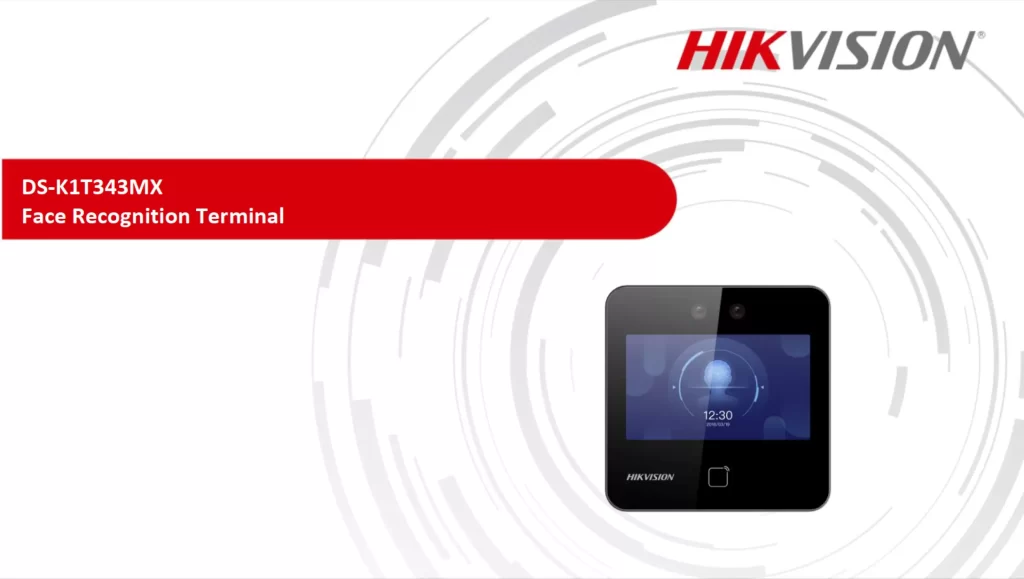
Hikvision: DS-K1T343MX – Technical Features and Specs

HKVISION: DS-K1T343MX - Technical
Hikvision: DS-K1T343MX - Technical

The HIKVISION DS-K1T341B serves as an advanced face recognition terminal that enhances secure access control and attendance management. This device combines cutting-edge technology with user-friendly features, making it ideal for both indoor and outdoor applications.

Hikvision: DS-K1T343MX – Technical User Interface and Benefits

User Interface

The user interface is an integral part of any device, and Hikvision has not disappointed in this regard with the DS-K1T343MX. The interface is interactive and intuitive, designed to be easy-to-use, even for non-tech savvy individuals. It boasts a functional and straightforward dashboard that gives users quick access to important features, from system alerts to access logs, all available at the user’s fingertips.

Benefits of the DS-K1T343MX

The benefits of the Hikvision DS-K1T343MX are twofold, centralized around security and access control and ease of installation and configuration.

Security and Access Control

As with any device aimed towards enhancing security, the Hikvision DS-K1T343MX thrives in this domain.

Enhanced Security Features

The DS-K1T343MX is equipped with cutting-edge security features such as face recognition technology and fingerprint scanning. Its multiple verification methods ensure that access is granted to authorized individuals only. With alarms for tampering and invalid verification attempts, the DS-K1T343MX plays a significant role in securing your premises.


Access Management

Managing access with the DS-K1T343MX is as simple as it gets. It allows for batch importing and exporting of user data, thus saving time and effort. In scenarios where certain individuals require temporary access, like contractors or guests, the DS-K1T343MX enables easy addition and deletion of user data.

Ease of Installation and Configuration

Not only does the DS-K1T343MX excel in security features, but also in its ease of installation and user-friendly configuration.

Hikvision: DS-K1T343MX – Technical Installation of Hikvision: DS-K1T343MX

The Hikvision DS-K1T343MX is designed keeping in mind the need for swift and hassle-free installation. With its compact design, it can be easily fitted in any environment, indoors or outdoors. It comes with detailed instructions that guide you through the installation process step-by-step.

Configuration Options

Once installed, configuring the DS-K1T343MX is quite straightforward. It provides an intuitive interface that allows users to set up security protocols effortlessly, define user permissions, and schedule access times. The device can be connected to the local network via Ethernet, enabling remote access and configuration.

Conclusion

In summary, the Hikvision: DS-K1T343MX – Technical Specifications not only surpasses in delivering enhanced security but also offers a smooth installation and setup process. It’s an ideal solution for anyone in need of a reliable and efficient security system.

Facial Recognition Access Control: The Future of Security

Facial Recognition Access Control

Step into the future with the HKVISION DS-K1T343MX Biometric Access Control System, a cutting-edge solution that revolutionizes security. This state-of-the-art system combines advanced biometric technology with seamless integration, ensuring efficient and secure access control for any organization.

With its sleek design and innovative features, the DS-K1T343MX sets a new standard for Facial Recognition Access Control. Say goodbye to traditional keycards and PIN numbers – this system utilizes fingerprint recognition to grant access. This not only eliminates the risk of lost or stolen credentials but also provides a higher level of security, as fingerprints are unique to each person.

How the biometric access control system works

The HKVISION DS-K1T343MX Biometric Access Control System operates through a sophisticated mechanism that primarily relies on biometric technology, specifically facial recognition rather than fingerprint recognition, enhancing the security by capturing unique biometric data from an individual’s face and converting it into a digital format that can be securely stored and compared against future access attempts.

This process occurs in mere seconds, allowing for a quick and efficient access control experience. Once the fingerprint is scanned, the system checks the captured biometric data against the previously stored templates in its database. If a match is found, access is granted; if not, the system denies entry. This instantaneous verification process significantly reduces the time taken for authentication, making it ideal for high-traffic areas.

Biometric Access Control Devices

Benefits of the HKVISION DS-K1T343MX

  • Convenience for Users and Administrators
    • Eliminates the need for multiple access cards or complex passwords.
    • Users can gain access by simply scanning their fingerprints.
    • Streamlines the entry process, reducing time spent at access points.
  • Simplified Access Control Management
    • Easy enrollment and removal of users for administrators.
    • Quick updates to access permissions in response to changes (e.g., employee turnover or role changes).
    • Reduces the hassle of reissuing physical access cards.
  • Contribution to Operational Efficiency
    • Generates detailed access logs for monitoring who accessed specific areas and at what times.
    • Provides invaluable data for auditing purposes and identifying patterns or potential security breaches.
  • Integration Capabilities
    • Works seamlessly with other security technologies.
    • Enhances overall security management by centralizing access control with a biometric solution.
    • Improves defenses against potential threats by streamlining security protocols.

Understanding Facial Recognition Access Control

Understanding Facial Recognition Technology is a journey that begins with grasping the underlying principles of how Facial Recognition works. This technology, which is widely used in access control systems, operates on a few fundamental processes that ensure its effectiveness and reliability.

How Facial Recognition Works

How Facial Recognition Works involves a two-step process — face detection and analysis, followed by face mapping.

Face Detection and Analysis

Face Detection and Analysis is the first step in Facial Recognition Access Control technology. During this phase, the system identifies human faces within a digital image or video frame. The technology uses differentiating features, such as the eyes, nose, mouth, and the distance between these features, to distinguish a face. Post detection, the system conducts an intricate analysis of the facial features and creates a facial signature based on unique characteristics.

While this aspect of Facial Recognition Access Control is complex, understanding it helps to elaborate how these systems ensure only authorized individuals gain access in access control mechanisms.

Technology Behind Face Mapping

The Technology Behind Face Mapping continuously evolves to optimize the accuracy of facial recognition systems. In face mapping, the detected face is transformed into a mathematical representation, generating what is referred to as a faceprint. This faceprint, akin to a fingerprint, is unique for each individual, thus reducing the chances of inaccurate identification.

Visualizing the face as a complex three-dimensional structure, the technology maps out distinct features such as the contours of the eyes, nose, and mouth, and records the relative distances between these features. This comprehensive data provides sufficient information for the system to recognize a face reliably.

Key Components of the Facial Recognition Access Control

Understanding the Key Components of Facial Recognition Systems is crucial to comprehend how these systems function effectively as access control tools. The technology consists primarily of software algorithms and specific hardware requirements.

Software Algorithms

Software Algorithms form the core of facial recognition systems. These mathematical models scrutinize and process the data procured during face detection and analysis. The more refined the algorithm, the more accurate the facial recognition. Over time, software developers have sought to improve these algorithms, reducing error rates and increasing their ability to differentiate even the slightest variations among faces.

Hardware Requirements

In tandem with the software, Hardware Requirements also play a vital role in ensuring the efficiency of facial recognition systems. This hardware includes high-resolution cameras and advanced infrared sensors that capture detailed facial images even in varying light conditions. Strong processing capabilities are also a requirement to analyze and match facial data in real time.

With a deep understanding of facial recognition technology’s fundamentals and its key components, you are better equipped to appreciate its use in access control systems. Real-world applications of this technology can range from mundane tasks such as unlocking a smartphone to providing enhanced security in a high-risk environment.

Deploying the Facial Recognition Access Control Device

To ensure a successful deployment of the HKVISION DS-K1T343MX Biometric Access Control System, several best practices should be followed. First and foremost, conducting a thorough needs assessment is crucial. Organizations should evaluate their specific security requirements, access control policies, and existing infrastructure before installation. This assessment helps determine the optimal placement of biometric devices, ensuring they are installed in high-traffic areas while maintaining convenience for users.

Understanding the unique needs of the organization will guide the deployment process and enhance the effectiveness of the system. Another essential practice is to engage in comprehensive user training. Providing training sessions for employees on how to use the biometric system effectively will alleviate concerns and resistance to change.

HIKVISION DS-K1T341BMW: Face Recognition Terminal Features

HIKVISION DS-K1T341BMW - Integration
HIKVISION DS-K1T341BMW

In a surveillance-driven world, integrating robust access control systems into the broader security infrastructure is critical. Moreover, one paramount product that has the right potential to precisely fit into this equation is the HIKVISION DS-K1T341BMW. Indeed, this Overview aims to dissect the intricate nature of the DS-K1T341BMW, its potential for seamless integration, and how it champions the cause of modern access control.

Furthermore, we will take you on a comprehensive journey exploring its unique features, specifications, and most importantly, its platform compatibility. Ultimately, we guarantee that this narrative will enrich you significantly towards understanding the capabilities of DS-K1T341BMW. So, buckle up and let’s delve into the fascinating world of HIKVISION integration capabilities.

HIKVISION DS-K1T341BMW Overview and Specifications

The HIKVISION DS-K1T341BMW is a state-of-the-art security solution that challenges conventional standards of access control. Designed with advanced technology, it reduces risks and significantly enhances security in multifarious ways. We delve into its remarkable features and technical specifications in this section, providing insights into why it stands out.

Key Features of the HIKVISION DS-K1T341BMW

Enhanced Security Features

The DS-K1T341BMW offers high-level security features which considerably raise the barriers for unauthorized entries. It introduces tampering detection and intrusion alarms that alert administrators immediately in the event of unusual activities. Similarly, it has a robust door sensor that functions 24/7 even when the device is offline, making it an ideal choice for sensitive and high-risk areas.

Facial Recognition Technology

Leveraging advanced facial recognition technology, the DS-K1T341BMW quickly and accurately identifies registered users. Specifically, this feature understands and interprets human facial features, before comparing them with the stored data. Moreover, even in low light or amid a crowd, it ensures efficient recognition. Ultimately, Its ability to identify a large number of faces within milliseconds helps in minimizing queues and reducing waiting time at gateways.

User Interface and Design

The DS-K1T341BMW boasts an intuitive user interface and a sleek design that combines aesthetic appeal with user-friendliness. Moreover, the 7-inch screen display provides clear visuals of data, while the touch-screen feature makes navigation easy. In addition, the brilliance of its design is rounded off with durable, weather-proof construction, which permits outdoor deployment.

Technical Specifications

Device Dimensions and Weight

When it comes to physical characteristics, the DS-K1T341BMW is compact and lightweight. The dimensions measure 123.27mm (W) x 280mm (H) x 25mm (D), making it a practical option for various spaces. Weighing just 1kg, it facilitates easy installation without the need for heavy-duty supports.

Environmental and Power Specifications

Awareness towards environmental sustainability has thus led to the design of the DS-K1T341BMW with low power consumption. For instance its power supply ranges from 12V DC to 24V DC, while consuming less than 20W. Furthermore, the device also functions optimally at temperatures ranging from -20°C to +60°C, which makes it adaptable to diverse climate conditions.

By providing a fostering harmony of enhanced security, intuitive design, and environmental sustainability in its specifications, the HIKVISION DS-K1T341BMW ultimately stands as an optimal choice for modern security solutions.

Integration Capabilities with Third-Party Systems

Integrating the HIKVISION DS-K1T341BMW with third-party systems can unlock a host of benefits for businesses. These integrations extend the functionality of the HIKVISION device and make it a more versatile security solution.

Software Integration Options

The capabilities of the DS-K1T341BMW go beyond its standalone features. Integration with other software is a key aspect of maximizing its use.

Integration with Access Control Systems

A crucial integration point for the HIKVISION DS-K1T341BMW is with access control systems. For example, these systems allow authorized individuals to enter specific areas while simultaneously keeping unauthorized people out. Moreover, by integrating the DS-K1T341BMW with these systems, it thus provides an added layer of security. Additionally, this setup enhances overall monitoring and response capabilities.

As a result, entry is granted based on facial recognition, ensuring only recognized individuals can gain access.

Compatibility with Security Management Software

The HIKVISION DS-K1T341BMW can additionally be integrated with security management software. For instance, these platforms provide a centralized dashboard for managing different security devices within a facility. Consequently, this setup aids in continuous monitoring and quick responsiveness. As a result, integrating the DS-K1T341BMW with such software therefore improves overall security management efficiency.

Applications of Access Control Terminals

  • Corporate Offices:
    • Ideal for managing employee access to different areas within office buildings.
    • Enhances security and operational efficiency.
  • Residential Buildings:
    • Used in apartment complexes and gated communities.
    • Controls entry points, ensuring that only authorized residents gain access.
  • Educational Institutions:
    • Suitable for schools and universities.
    • Monitors and controls access to campus facilities, maintaining a secure environment for students and staff.
  • Healthcare Facilities:
    • Hospitals and clinics can manage access for patients, visitors, and staff.
    • Ensures a secure atmosphere while facilitating efficient movement.
  • Public Facilities:
    • Libraries, museums, and similar venues can regulate visitor access.
    • Improves overall security measures.
  • Transportation Hubs:
    • Airports and train stations benefit from quick recognition capabilities.
    • Manages passenger flow and enhances security protocols.
  • Industrial Settings:
    • Factories restrict access to sensitive areas.
    • Ensures that only authorized personnel enter critical zones.
  • Retail Environments:
    • Retail stores control access to stockrooms or restricted areas.
    • Monitors employee attendance effectively.

Integration Capabilities of HIKVISION DS-K1T341BMW

  • Communication Protocols
    • The DS-K1T341B supports multiple communication protocols, including:
      • TCP/IP: Facilitates seamless integration into existing network infrastructures.
      • Wi-Fi: Enhances connectivity options.
  • Compatible Interfaces
    • The device features several interfaces for connectivity:
      • RS-485: Used for connecting to external access controllers.
      • Wiegand Input/Output: Allows integration with various card readers and other access control devices.

Connectivity Options: HIKVISION DS-K1T341BMW

  • Data Transmission
    • Supports TCP/IP protocol for efficient data transmission.
  • External Device Compatibility
    • Compatible with external card readers and access controllers via:
      • RS-485: For secure connections.
      • Wiegand protocols: For broader integration options.
  • Remote Management
    • Control door access and view live feeds via the Hik-Connect application.