The ZKTeco F17 is a compact, IP65-rated fingerprint terminal for access control and time attendance. It features Ethernet connectivity, a built-in keypad, RF card reader scanner, and managing support for up to 3,000 fingerprint templates, 10,000 cards, and 100,000 transactions. It is durable and suitable for harsh outdoor environments.
Managing and Updating Enrolled Passwords on ZKTeco F17
Step 01
Press the Menu Button
Step 02
If you do not have an Admin Password setup, continue to Step 5
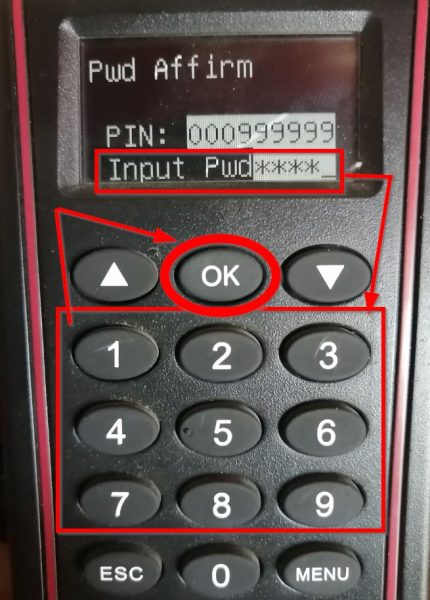
If you have an Admin password set up, it will show Admin Affirm 1 –
Start typing your Code/Pin, for example 999999.
Step 03
After you entered the Code/Pin, Press OK.
Step 04
Enter your password using the keypad and then Press OK.
Step 05
You are now in the MENU section. For this task, we will select User Manage and then Press OK.
Step 06
Select Enroll User and Press OK.
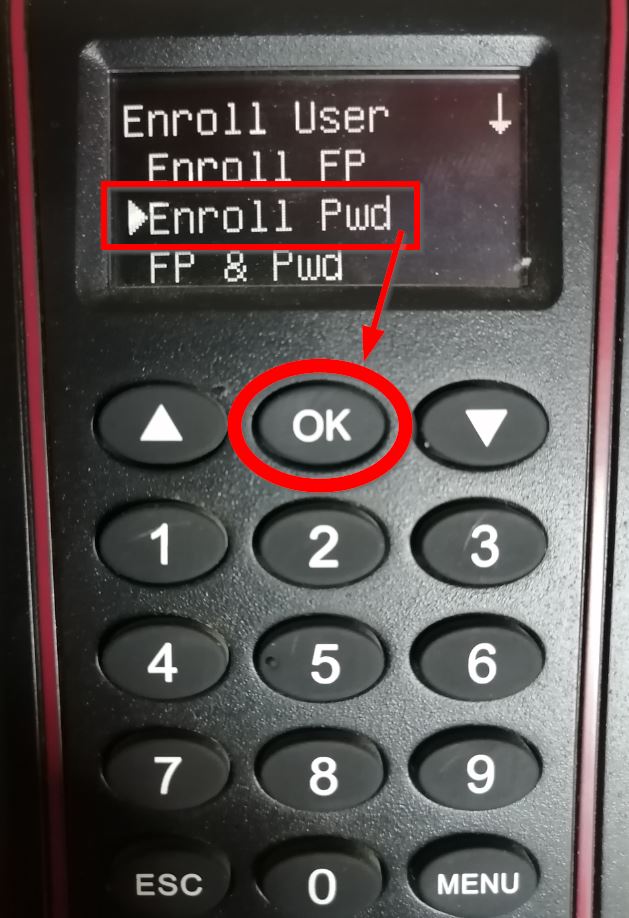
Step 07
Select Enroll Pwd (Password), then Press OK.
Step 08
You will then be asked if it is a New Enroll which in this case is not, so
Press the ESC (Escape) button.
Step 09
Then Enter the clock code of the employee you want to change the password for, and Press OK.
Step 10
Input the New Password and Press OK.
Step 11
Affirm the New Password, then Press OK.
Step 12
Press OK to Save.
Step 13
You will then be asked if you want to continue with the change, then Press OK
Step 14
When back on this page, just Press the ESC (Escape) button till you reach the Home Screen. Now you can ask the employee to type in his clock code and press OK, then input his new password and Press OK again to clock IN/OUT.
ZKTeco – F17: How-To change an enrolled password.
To contact Biosyn about updating or changing an enrolled passwords on ZkTeco F17, call their sales team at the number provided on their website. Biosyn’s knowledgeable consultants can guide you through the scanner complex setup process and explain in detail how to configure the device for both standalone or networked operations, ensuring that you fully understand each step and can utilize the device effectively for your specific needs.
The consultants at Biosyn offer valuable guidance in setting up devices for independent or networked functionalities, ensuring users navigate the complex installation process effectively.